Actions
Bug #328
closedVerify employee cannot edit a leave request after it has been approved by the Reporting Manager
Start date:
07/17/2026
Due date:
% Done:
100%
Estimated time:
Platform:
Android
Description
| Field | Details |
|---|---|
| Test Case ID | TC_LEAVE_BL_019 |
| Title | Verify employee cannot edit a leave request after it has been approved by the Reporting Manager |
| Module | HRMS → Leave Management |
| Priority | High |
| Test Type | Business Logic |
| Preconditions | User is logged in. A leave request has been submitted and approved by the Reporting Manager. |
| Test Data | Approved Leave Request |
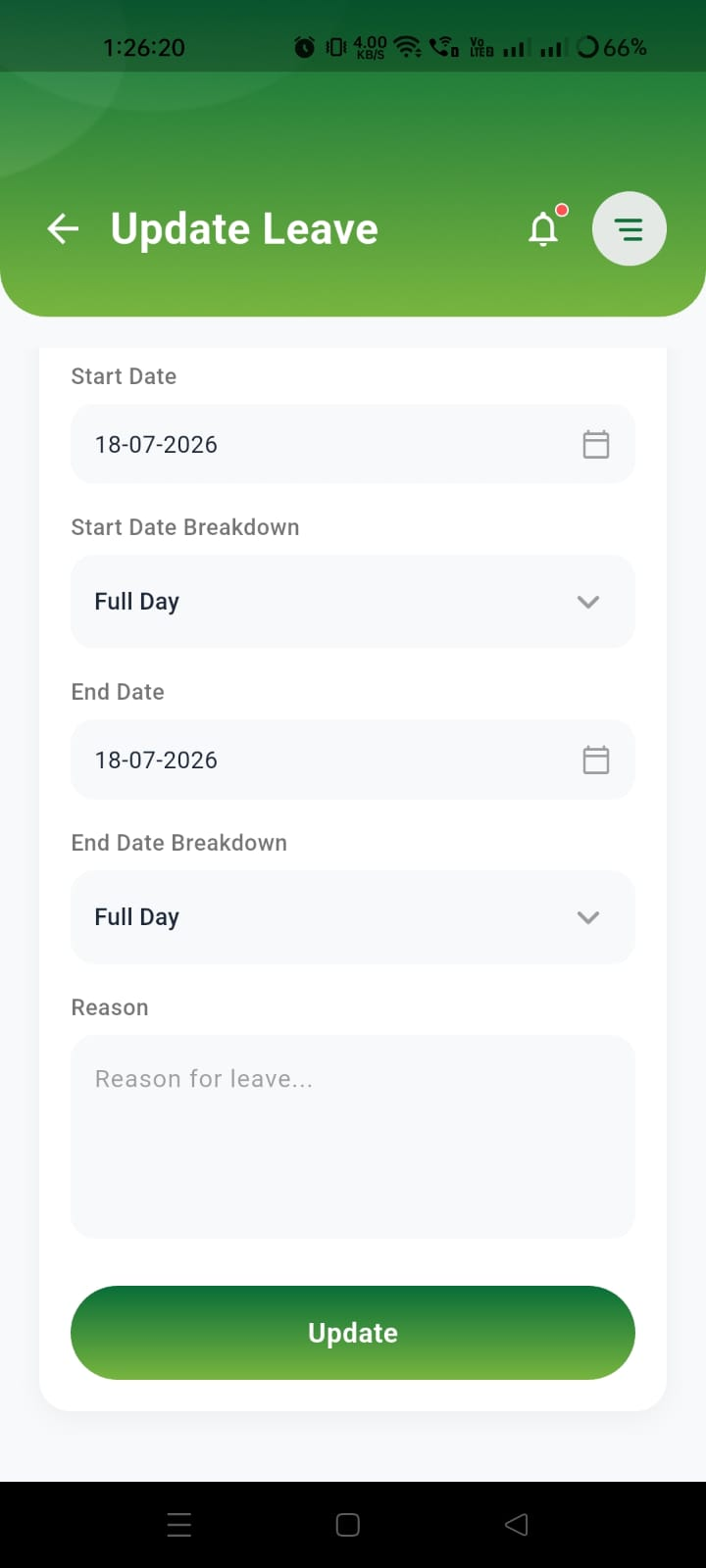
| Test Steps | 1. Login to the mobile application. 2. Navigate to Leave Status. 3. Open a leave request that has already been Approved by the Reporting Manager. 4. Tap the Edit/Update option. 5. Try to modify the leave details and save the changes. |
| Expected Result | Once a leave request is approved, the employee should not be allowed to edit or update the leave details. The Update/Edit option should be disabled or hidden, or the system should display an appropriate validation message. |
| Actual Result | The employee is able to open the Update Leave screen and modify the leave request even after it has been approved by the Reporting Manager. |
| Status (Pass/Fail) | Fail |
| Reported By (Date) | Raja MK (17-07-2026) |
Files
Actions