Actions
Bug #436
closedVerify that the attachment field remains empty until the user selects a file
Start date:
07/28/2026
Due date:
% Done:
100%
Estimated time:
Platform:
Android
Description
| Field | Details |
|---|---|
| Test Case ID | TC_EL_026 |
| Module | Leave Management |
| Feature | Apply Leave – Attachment Upload |
| Test Case Title | Verify that the attachment field remains empty until the user selects a file |
| Testing Type | Functional Testing |
| Precondition | User is logged in and navigated to the Apply Leave screen. |
| Steps | 1. Open the Apply Leave screen. 2. Click/Tap the Upload Attachment field. 3. Observe the attachment field before selecting any file. 4. Cancel the file picker without selecting a file (or observe immediately after clicking Upload). |
| Expected Result | The attachment field should remain empty and display the placeholder text (e.g., "Image or document under 5MB"). No file name should be displayed until the user explicitly selects a valid file. |
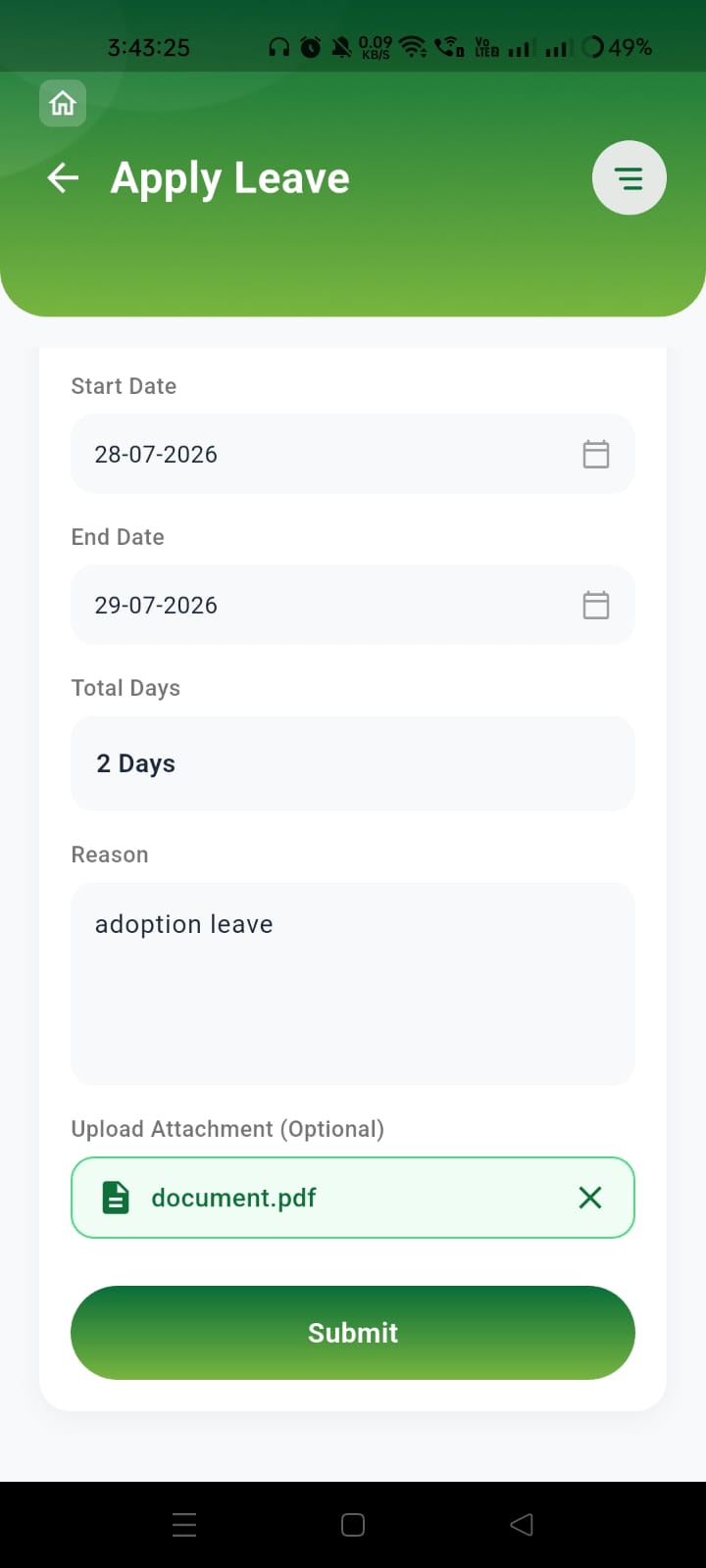
| Actual Result | The attachment field automatically displays "document.pdf" immediately after clicking the upload action, even though no file has been selected by the user. |
| Severity | Medium |
| Priority | Medium |
| Status | Fail |
Files
Actions