Actions
Bug #500
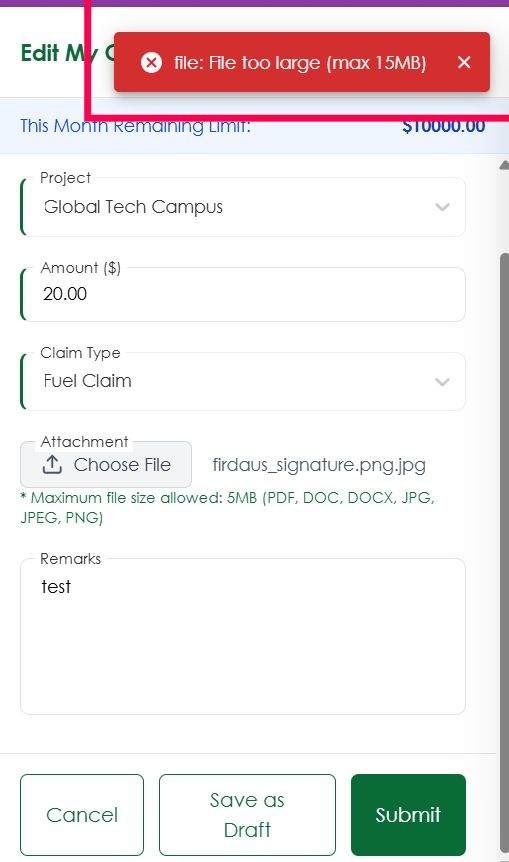
openVerify file size validation message is consistent for attachment upload
Start date:
08/04/2026
Due date:
% Done:
0%
Estimated time:
Platform:
Web
Description
| Test Case ID | TC_CLM_014 |
|---|---|
| Test Case Title | Verify file size validation message is consistent for attachment upload |
| Module | My Claims |
| Feature | Attachment Upload |
| Priority | Medium |
| Severity | Minor |
| Precondition | User is logged in and navigated to the Claim creation/edit page. |
| Test Steps | 1. Navigate to My Claims. 2. Click Add Claim or Edit Claim. 3. Observe the helper text for the maximum allowed file size. 4. Upload an attachment larger than the displayed limit (e.g., a 6 MB image when the helper text shows 5 MB). 5. Observe the validation toast message. |
| Test Data | 6 MB JPG/PNG image |
| Expected Result | The validation message should match the configured file size limit. If the helper text displays 5 MB, the toast should also state "File too large (max 5MB)". If the actual limit is 15 MB, the helper text should be updated accordingly, and a 6 MB file should upload successfully. |
| Testing Type | Functional, UI, Validation, Regression |
Files
No data to display
Actions