Actions
Bug #513
openVerify Mandatory Validation Messages are Displayed for All Required Fields
Start date:
08/05/2026
Due date:
% Done:
0%
Estimated time:
Platform:
Web
Description
| Description | |
|---|---|
| Test Case ID | TC_USXXX_001 |
| Test Case Name | Verify Mandatory Validation Messages are Displayed for All Required Fields |
| Module | Employee Master – Subsidy Details |
| Priority | Medium |
| Test Type | Functional |
| Precondition | User is logged in and navigated to the Employee Edit page. |
| Test Steps | 1. Login to the application. 2. Navigate to Employee Master. 3. Open an existing employee record in Edit mode. 4. Navigate to the Subsidy Details section. 5. Leave all mandatory fields blank, including Institution Code and Bond Expiry Date. 6. Click Next or Save. 7. Observe the validation messages displayed for the required fields. |
| Expected Result | Mandatory validation messages should be displayed for all required fields, including Institution Code and Bond Expiry Date. The form should not proceed until all mandatory fields are completed. |
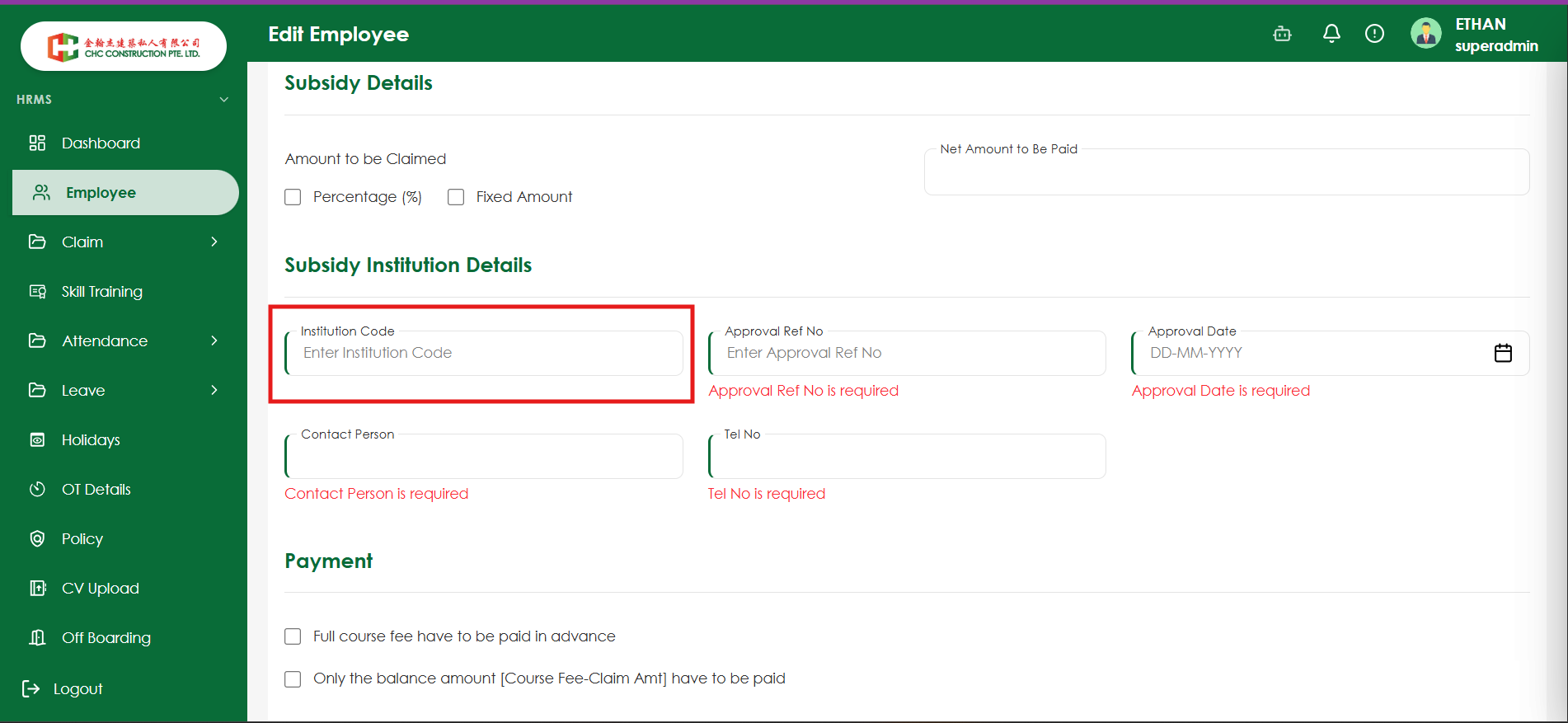
| Actual Result | Validation messages are displayed for some mandatory fields only. Institution Code and Bond Expiry Date do not display validation messages when left blank. |
Files
No data to display
Actions