Actions
Bug #553
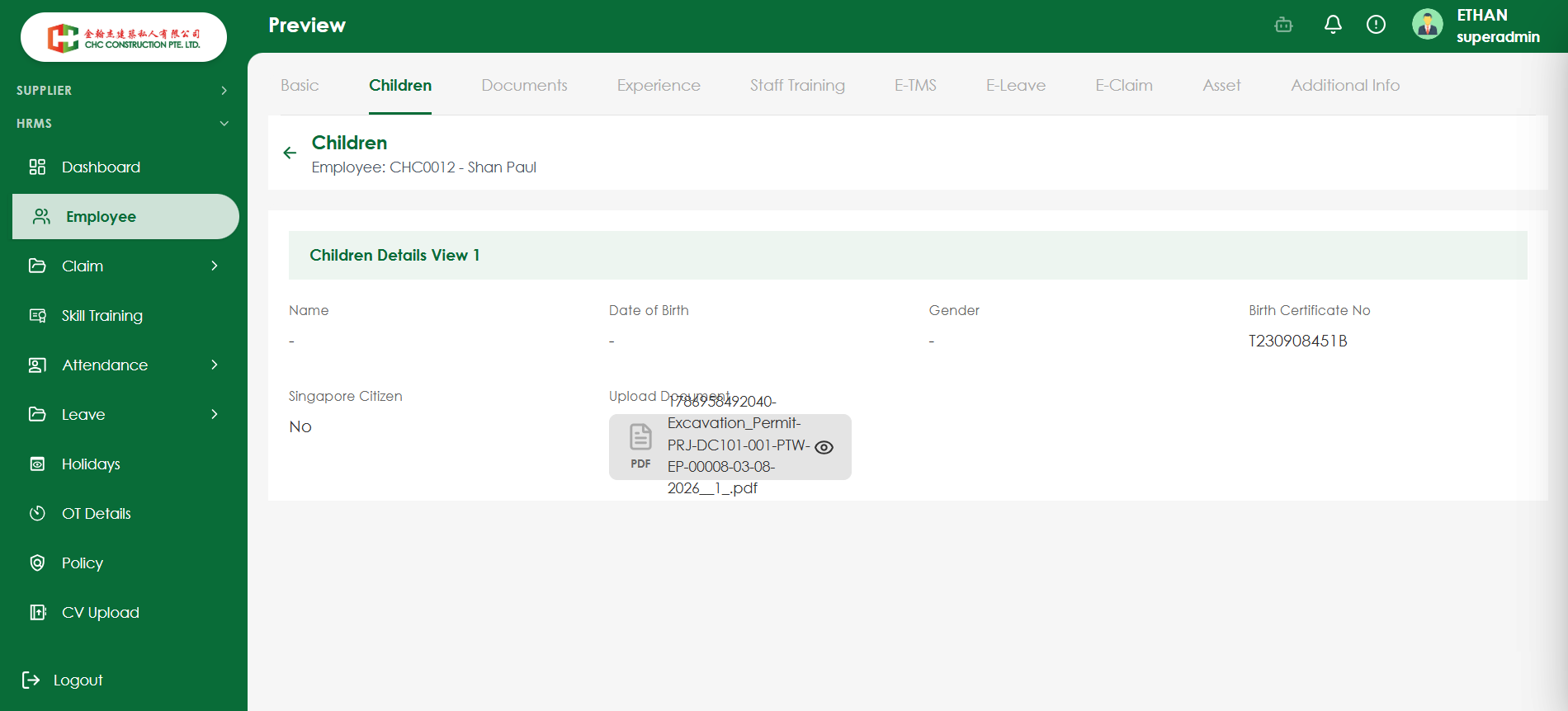
openVerify that the uploaded document filename does not overlap with the Upload Document label
Start date:
08/17/2026
Due date:
% Done:
0%
Estimated time:
Platform:
Web
Description
| Field | Details |
|---|---|
| Test Case ID | TC_EMP_DOC_001 |
| Test Scenario | Verify that the uploaded document filename does not overlap with the Upload Document label |
| Module | HRMS – Employee |
| Priority | Medium |
| Testing Type | UI Testing / Functional Testing |
| Precondition | Employee record should be available with access to the Children section |
| Test Steps | 1. Login to the application. 2. Navigate to HRMS → Employee. 3. Open an employee record. 4. Navigate to the Children section. 5. Upload a valid document with a long filename. 6. Save the details. 7. Open the Preview/View page. 8. Observe the Upload Document label and uploaded document filename. |
| Test Data | Valid PDF document with a long filename |
| Expected Result | The Upload Document label and uploaded document filename should be displayed with proper spacing and alignment. The filename should not overlap, hide, or interfere with the label or other UI elements. |
| Actual Result | To be updated during execution |
Files
No data to display
Actions