Actions
Bug #554
openVerify duplicate validation for Employee Mobile Number
Start date:
08/17/2026
Due date:
% Done:
0%
Estimated time:
Platform:
Web
Description
| Field | Details |
|---|---|
| Test Case ID | TC_EMP_MOB_001 |
| Module | Employee |
| Test Scenario | Verify duplicate validation for Employee Mobile Number |
| Precondition | The employee mobile number already exists for another employee |
| Priority | High |
| Testing Type | Functional / Validation / UI |
| Test Steps | 1. Navigate to Employee → Edit Employee. 2. Open the Personal Information section. 3. Enter an already registered mobile number in the Employee Mobile Number field. 4. Click Save. |
| Test Data | Existing Employee Mobile Number: +65 9567-8901
|
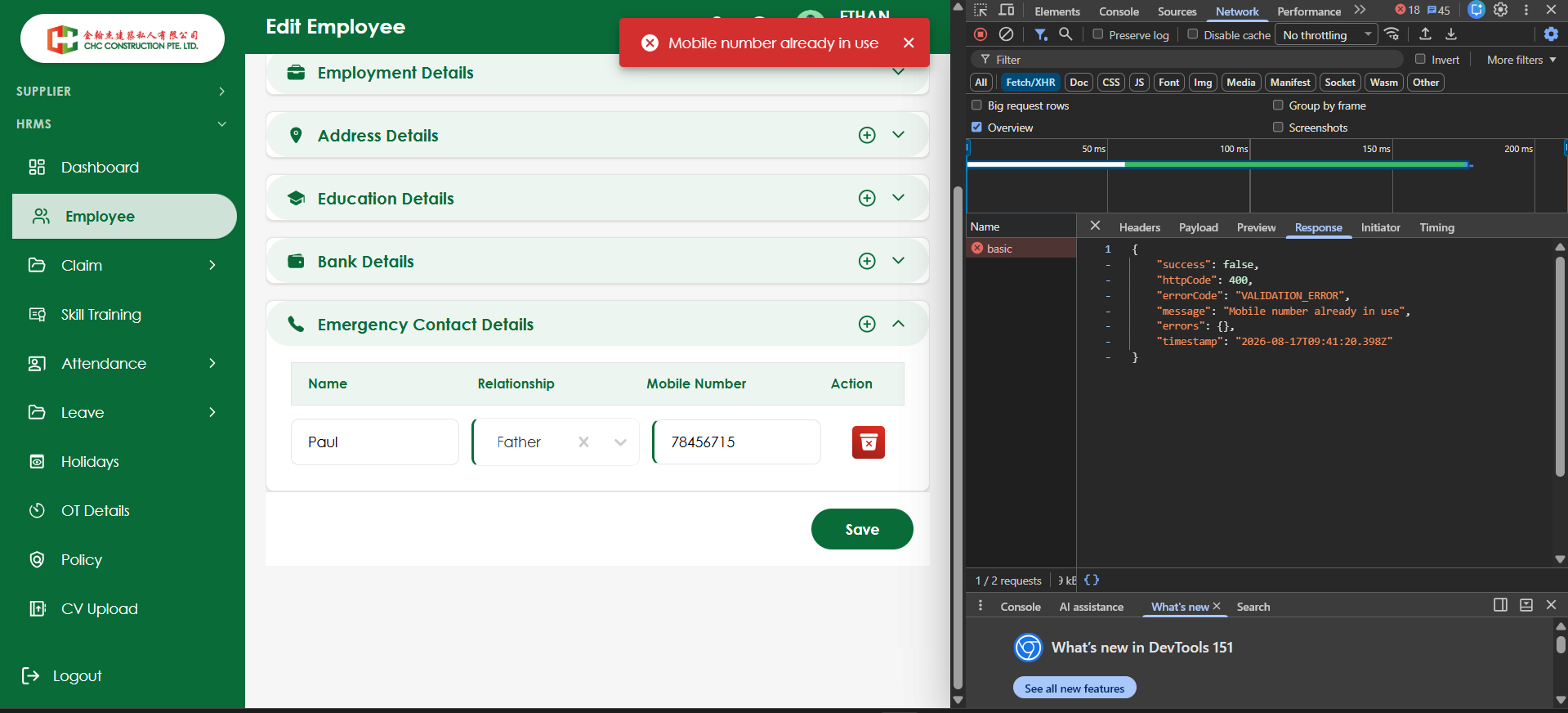
| Expected Result | System should display “Mobile number already in use” against/below the Employee Mobile Number field, highlight the field as invalid, and prevent the employee details from being saved. |
| Actual Result | The validation message is displayed only as a top-right toast notification and is not displayed against the Employee Mobile Number field. |
| Status | Fail |
Files
No data to display
Actions