Actions
Bug #556
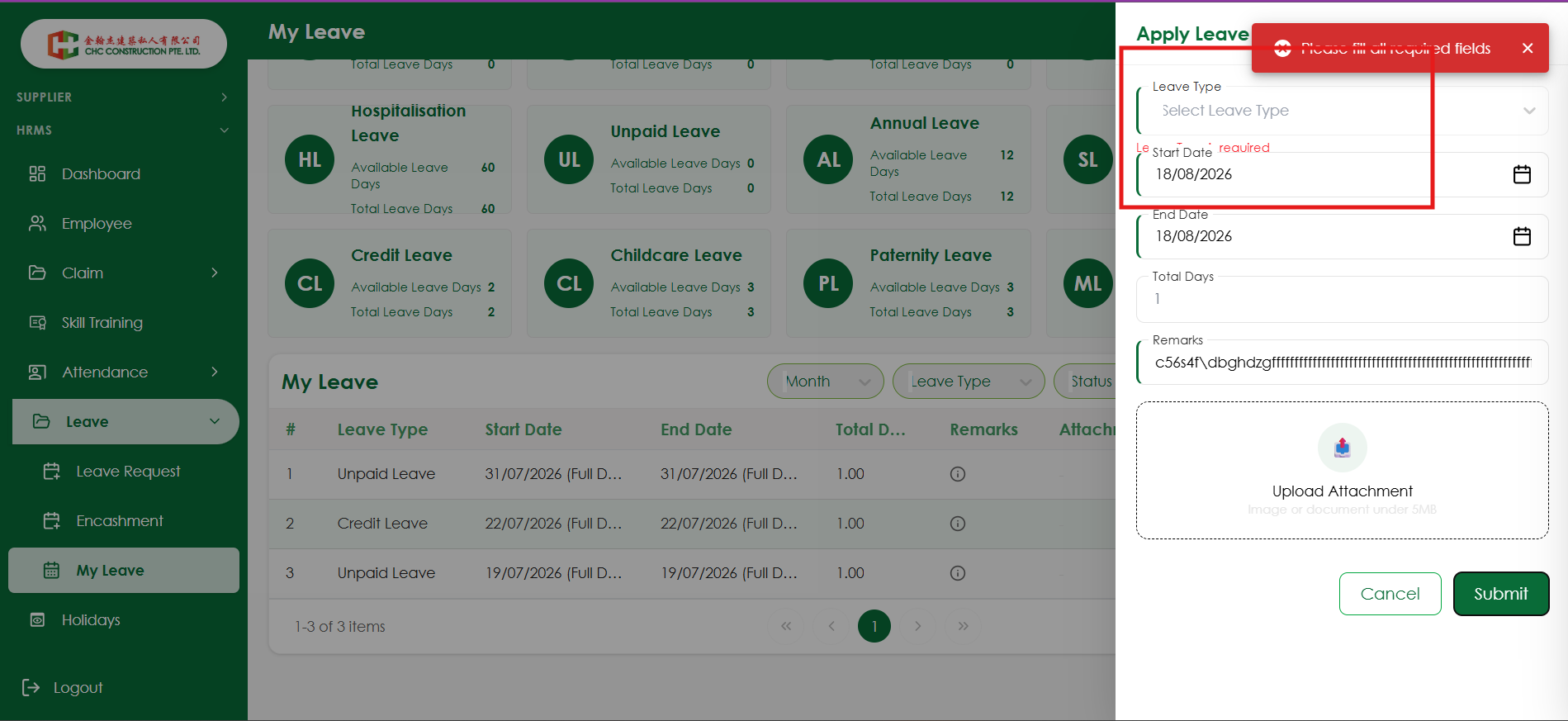
openVerify validation messages and error toast do not overlap the Apply Leave form
Start date:
08/17/2026
Due date:
% Done:
0%
Estimated time:
Platform:
Web
Description
| Field | Details |
|---|---|
| Test Case ID | TC_UI_LEAVE_001 |
| Module | Leave Management |
| Page | My Leave – Apply Leave |
| Test Scenario | Verify validation messages and error toast do not overlap the Apply Leave form |
| Precondition | User should be logged in and should have access to the My Leave page |
| Test Steps | 1. Navigate to My Leave page. 2. Click Apply Leave. 3. Leave the mandatory Leave Type field blank. 4. Enter valid Start Date and End Date. 5. Click Submit. 6. Observe the validation message and error toast notification. |
| Expected Result | Validation messages should be displayed clearly below their respective fields without overlapping the field labels, borders, or other form elements. The error toast should not overlap the Apply Leave header, fields, validation messages, or close icon. |
| Actual Result | Validation messages and the error toast overlap the Apply Leave form content, affecting visibility and usability. |
| Priority | Medium |
| Severity | Medium |
| Status | Fail |
Files
No data to display
Actions