Actions
Bug #559
openVerify employee offboarding details can be submitted/updated successfully
Start date:
08/19/2026
Due date:
% Done:
0%
Estimated time:
Platform:
Web
Description
| Field | Details |
|---|---|
| Test Case ID | TC_OFF_XXX |
| Test Scenario | Verify employee offboarding details can be submitted/updated successfully |
| Precondition | Employee should have access to the Offboarding module and an employee record should exist |
| Test Steps | 1. Navigate to Employee → Offboarding. 2. Select an employee. 3. Enter/update the required offboarding details. 4. Click Submit/Update. 5. Observe the system response. |
| Expected Result | Offboarding details should be successfully submitted/updated, and a success confirmation message should be displayed. No technical error should be shown. |
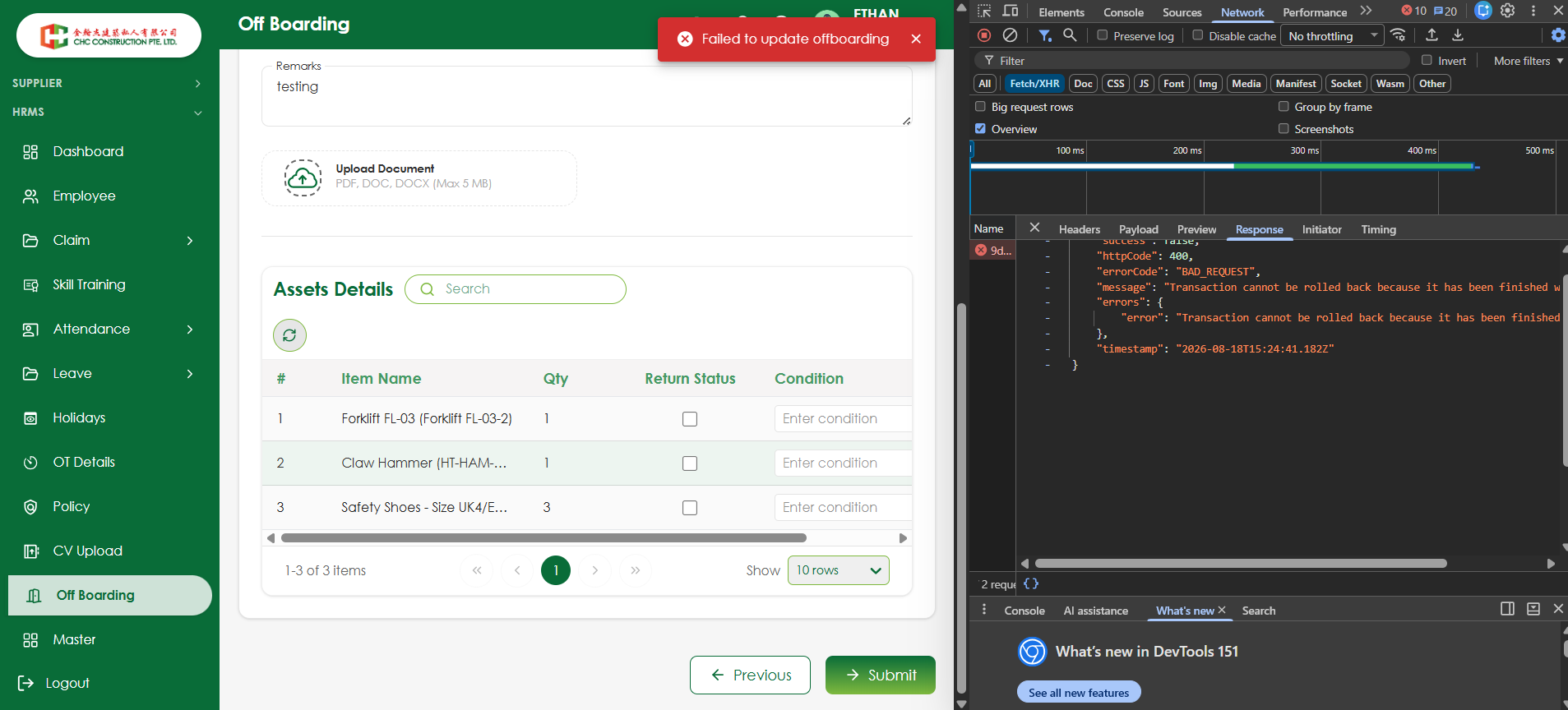
| Actual Result | System displays “Failed to update offboarding” while submitting/updating the offboarding details. |
| Test Type | Functional / Negative |
| Priority | High |
| Severity | Major |
| Status | Fail |
Files
No data to display
Actions