Actions
Bug #83
openVerify Maximum Length Validation for Salary Field
Start date:
06/22/2026
Due date:
% Done:
0%
Estimated time:
Platform:
Web
Description
| Test Case ID | TC_EXP_002 |
|---|---|
| Test Case Title | Verify Maximum Length Validation for Salary Field |
| Module | Employee Management / Experience |
| Priority | Medium |
| Test Type | Validation / Functional |
| Preconditions | User is on the Employee → Experience tab and has permission to add or edit experience details. |
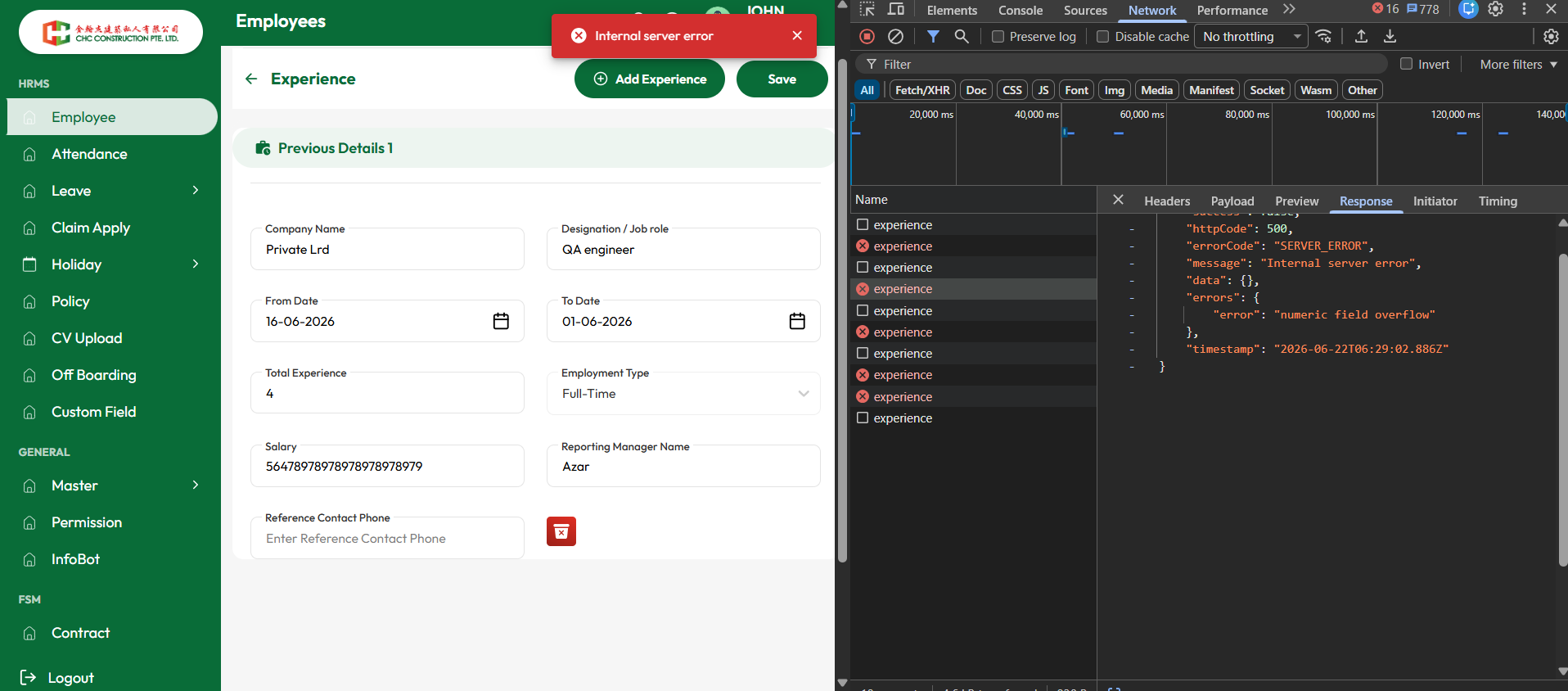
| Test Steps | 1. Navigate to Employee → Experience. 2. Click Add Experience or edit an existing experience record. 3. Enter valid data in all mandatory fields. 4. Enter an excessively large numeric value in the Salary field (e.g., 56478978978978978978979). 5. Click Save. |
| Expected Result | The system should validate the maximum allowed salary value and display a user-friendly validation message such as "Salary exceeds the maximum allowed limit". The record should not be saved and no server error should occur. |
| Actual Result | The system accepts the large numeric value and submits the request to the backend. The API returns a 500 Internal Server Error with the message "numeric field overflow". |
| Status | Fail |
Files
Actions