Actions
Bug #408
closedVerify the Change Password page is accessible for all role-based users
Start date:
07/21/2026
Due date:
% Done:
0%
Estimated time:
Platform:
Web
Description
| Field | Details |
|---|---|
| Test Case ID | TC_AUTH_014 |
| Module | Authentication / User Profile |
| Feature | Change Password |
| Test Case Title | Verify the Change Password page is accessible for all role-based users |
| Precondition | Users with different roles (Engineer, Project Manager, Supervisor, HR Manager, etc.) are active and logged in. |
| Test Data | Roles: Engineer, Project Manager, Supervisor, HR Manager, Super Admin |
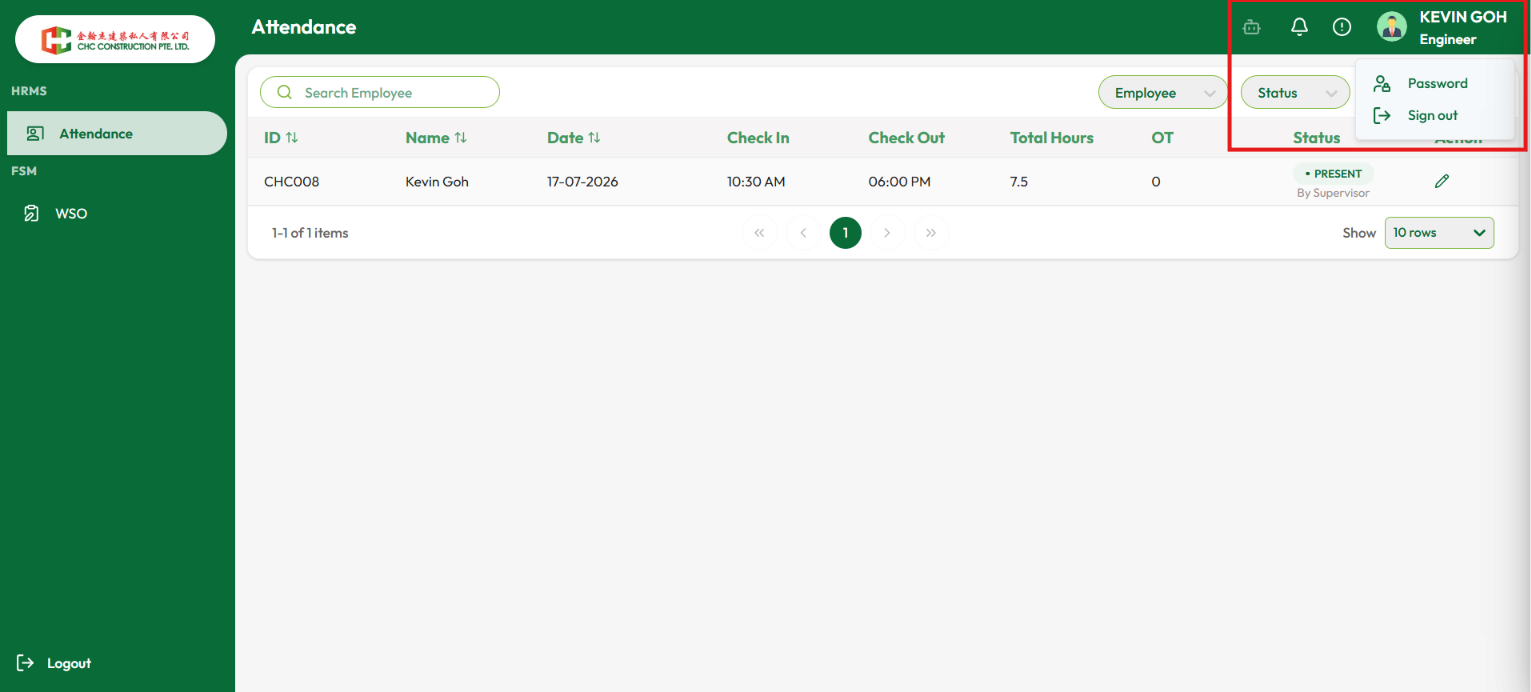
| Test Steps | 1. Log in with a role-based user account (e.g., Engineer). 2. Click the Profile icon in the top-right corner. 3. Select Password from the profile menu. 4. Observe whether the system redirects to the Change Password page. 5. Repeat the same steps for other role-based users. |
| Expected Result | All authorized role-based users should be successfully redirected to the Change Password page when they click the Password option in the profile menu. |
| Actual Result | The Change Password page is accessible only for the Super Admin account. For other role-based users, clicking the Password option does not redirect to the Change Password page, even though the option is visible in the profile menu. |
| Severity | High |
| Priority | High |
| Testing Type | Functional Testing / Role-Based Access Control (RBAC) |
Files
Actions