Actions
Bug #435
closedVerify that full-day leave request is submitted successfully without displaying half-day validation
Start date:
07/28/2026
Due date:
% Done:
100%
Estimated time:
Platform:
Android
Description
| Field | Details |
|---|---|
| Test Case ID | TC_EL_025 |
| Module | Leave Management |
| Feature | Apply Leave |
| Test Case Title | Verify that full-day leave request is submitted successfully without displaying half-day validation |
| Precondition | User is logged in and a leave type that does not allow half-day leave is available. |
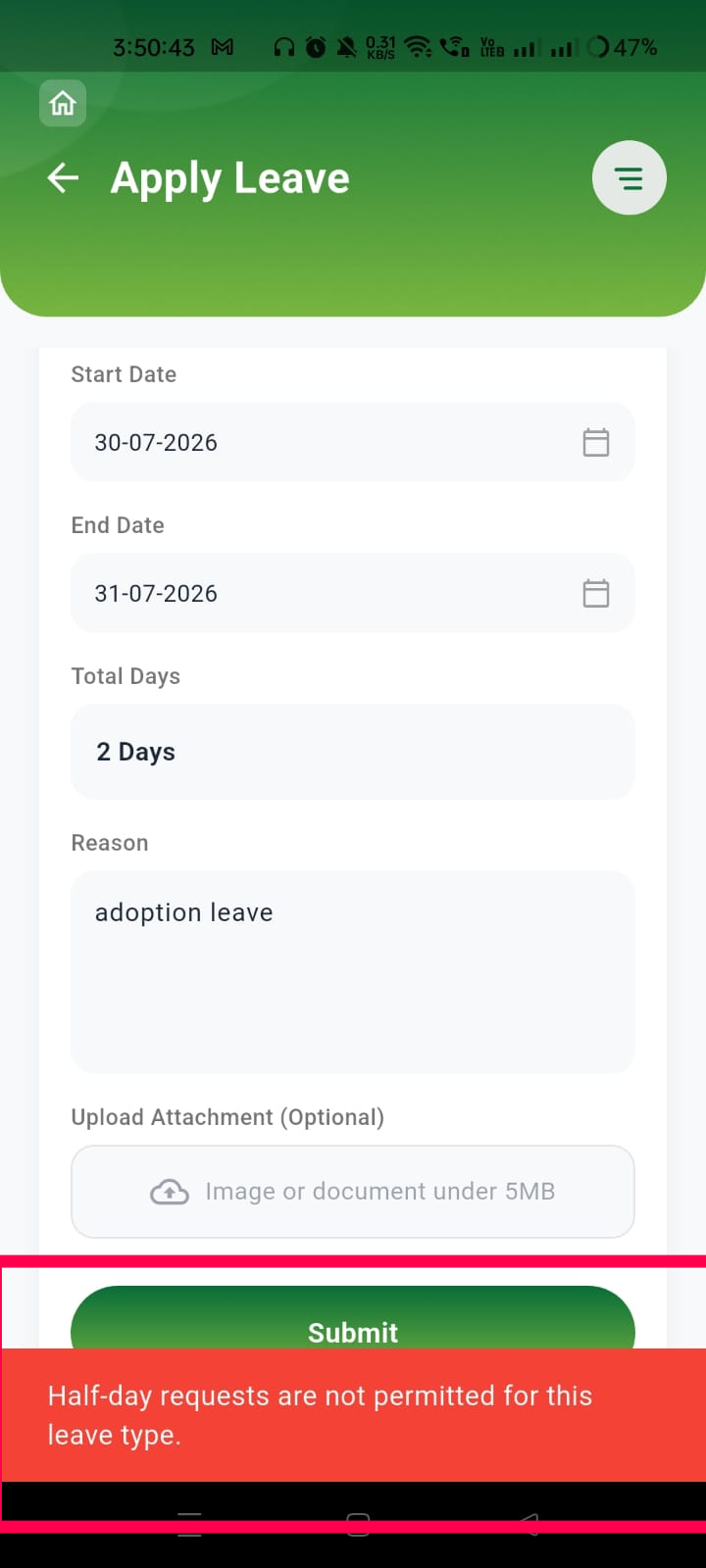
| Test Data | Leave Type: Adoption Leave Start Date: 30-07-2026 End Date: 31-07-2026 Reason: Adoption Leave |
| Steps | 1. Navigate to Apply Leave. 2. Select a leave type that does not permit half-day requests. 3. Select Start Date as 30-07-2026. 4. Select End Date as 31-07-2026. 5. Verify Total Days is calculated as 2 Days. 6. Enter a valid reason. 7. Leave the attachment field empty (optional). 8. Tap Submit. |
| Expected Result | The leave request should be submitted successfully. The system should not display the validation message "Half-day requests are not permitted for this leave type." since the request is for a full-day, multi-day leave. |
| Actual Result | The application incorrectly displays "Half-day requests are not permitted for this leave type." even though a full-day leave request has been submitted. |
| Severity | High |
| Priority | High |
| Status | Fail |
Files
Actions