Actions
Bug #440
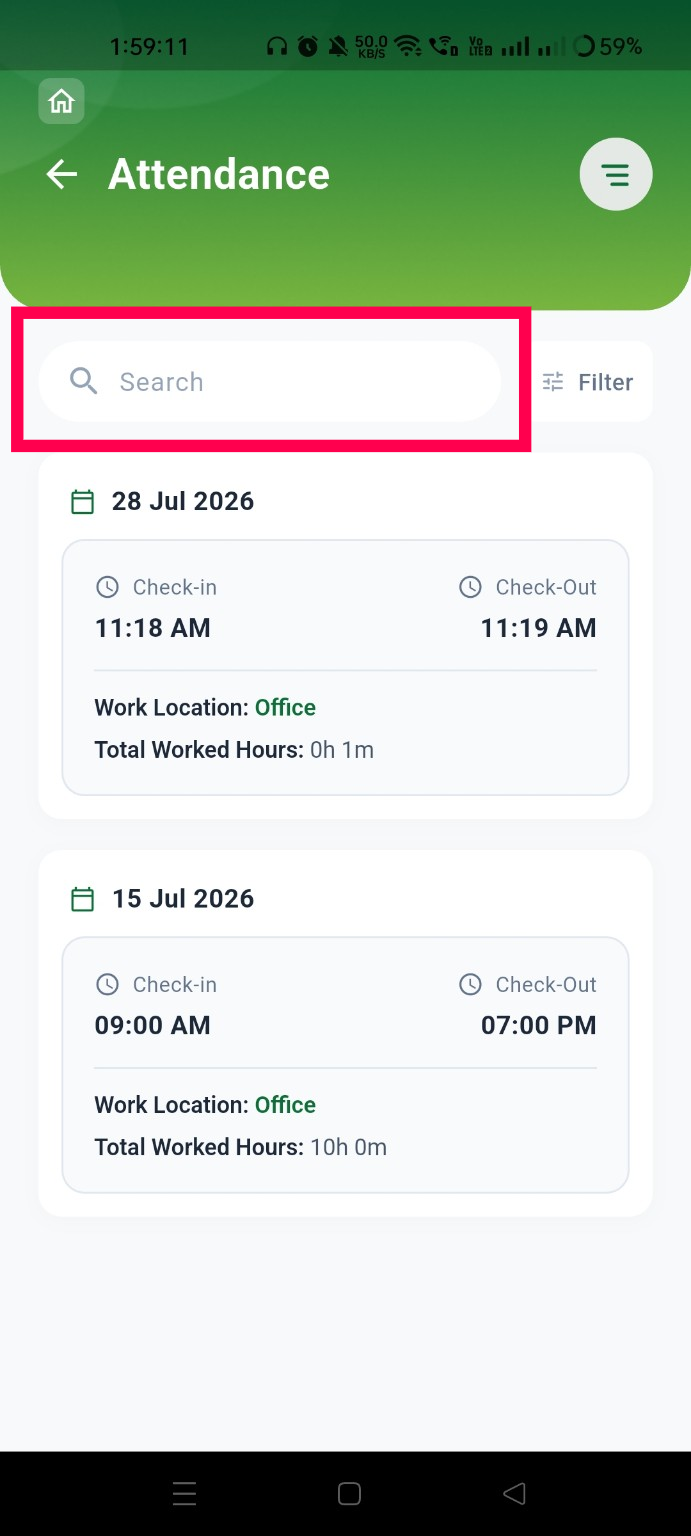
closedVerify that the search field clearly indicates the searchable fields in the Attendance List page
Start date:
07/28/2026
Due date:
% Done:
0%
Estimated time:
Platform:
Android
Description
| Field | Details |
|---|---|
| Test Case ID | TC_ATT_021 |
| Module | Attendance |
| Feature | Attendance List – Search |
| Test Case Title | Verify that the search field clearly indicates the searchable fields in the Attendance List page |
| Testing Type | Functional Testing / UI Testing |
| Precondition | User is logged in and navigated to the Attendance List page. |
| Steps | 1. Launch the mobile application. 2. Log in with valid credentials. 3. Navigate to the Attendance List page. 4. Observe the search field placeholder or label. 5. Attempt to search using different values (e.g., Employee Name, Employee Code, Project/Work Location, Date). |
| Expected Result | The search field should clearly indicate the searchable fields through placeholder text or helper text (e.g., "Search by Employee Name, Employee Code, Date") so users know what criteria can be used for searching. |
| Actual Result | The search field does not indicate which fields are searchable, making it unclear to users what search criteria are supported. |
| Severity | Low |
| Priority | Medium |
| Status | Fail |
Files
Actions