Actions
Bug #445
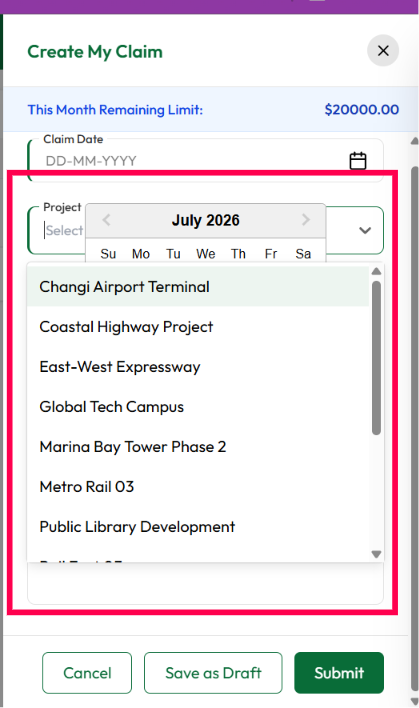
openVerify that the Project dropdown does not overlap with the Claim Date date picker
Start date:
07/29/2026
Due date:
% Done:
0%
Estimated time:
Platform:
Web
Description
| Field | Details |
|---|---|
| Test Case ID | TC_CLAIM_002 |
| Module | Claim Management |
| Feature | Apply for Claim |
| Test Case Title | Verify that the Project dropdown does not overlap with the Claim Date date picker |
| Testing Type | UI Testing |
| Precondition | User is logged in and has access to the Apply for Claim screen. |
| Steps | 1. Log in to the mobile application. 2. Navigate to Apply for Claim. 3. Tap the Project dropdown. 4. Observe the position of the dropdown in relation to the Claim Date field and its date picker. 5. Verify that all UI elements are displayed correctly without overlapping. |
| Expected Result | The Project dropdown should be displayed properly without overlapping the Claim Date field or its date picker. All fields should remain fully visible and accessible. |
| Actual Result | The Project dropdown overlaps with the Claim Date date picker, causing a UI display issue and affecting usability. |
| Severity | Medium |
| Priority | Medium |
Files
Actions