Actions
Bug #504
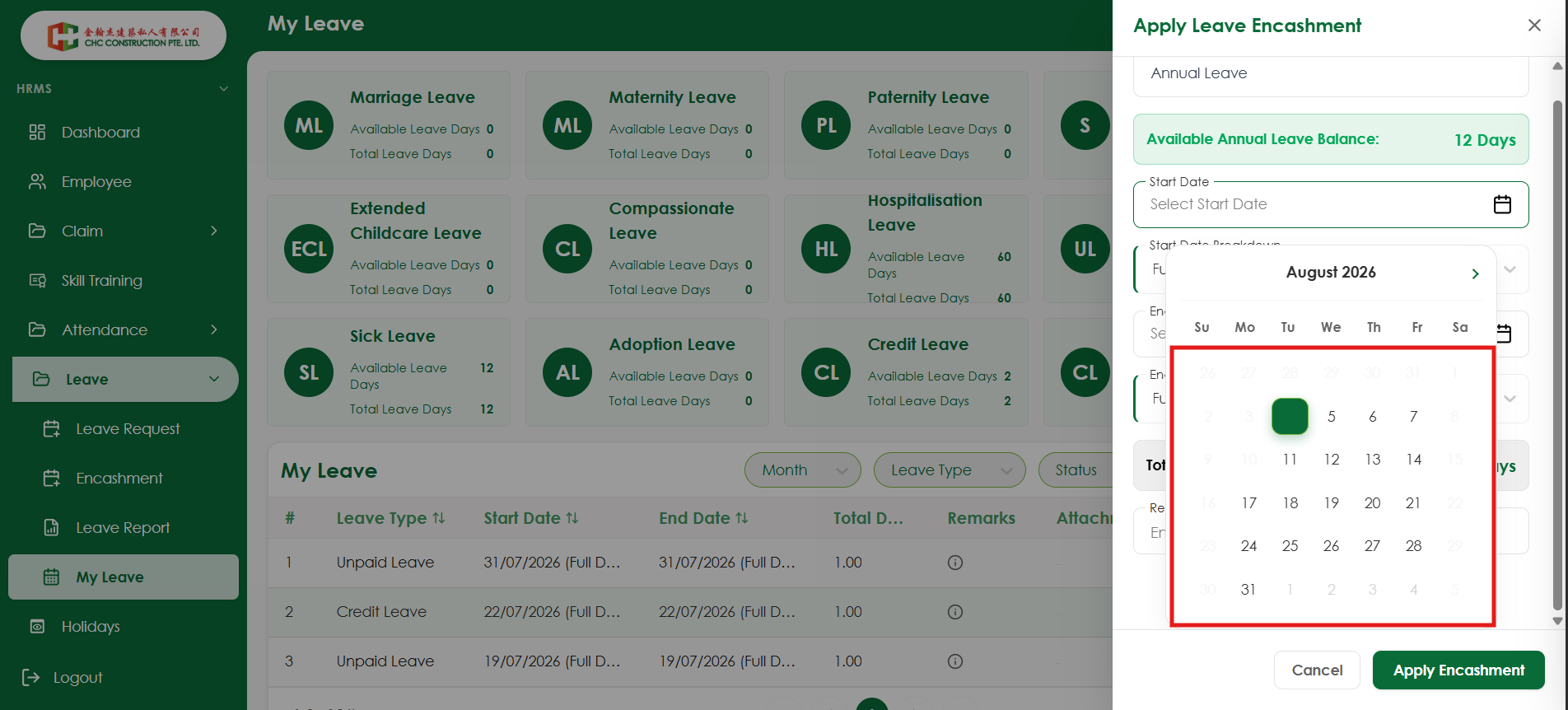
closedVerify that disabled dates in the calendar are clearly distinguishable from selectable dates.
Start date:
08/05/2026
Due date:
% Done:
0%
Estimated time:
Platform:
Web
Description
| Field | Details |
|---|---|
| Test Case ID | TC_LE_011 |
| Module | HRMS – Leave Encashment |
| Feature | Date Picker |
| Priority | Medium |
| Severity | Minor |
| Testing Type | UI Testing |
| Test Scenario | Verify that disabled dates in the calendar are clearly distinguishable from selectable dates. |
| Precondition | User is on the Apply Leave Encashment drawer. |
| Test Steps | 1. Navigate to My Leave → Encashment. 2. Click Apply Leave Encashment. 3. Open the Start Date calendar. 4. Observe the appearance of disabled and enabled dates. |
| Expected Result | Disabled dates should have a clear visual distinction (e.g., lighter color, reduced opacity, or disabled style) from selectable dates. |
| Actual Result | Disabled dates are not clearly distinguishable from enabled dates, making it difficult for users to identify unavailable dates. |
| Status | Fail |
Files
Actions