Actions
Bug #534
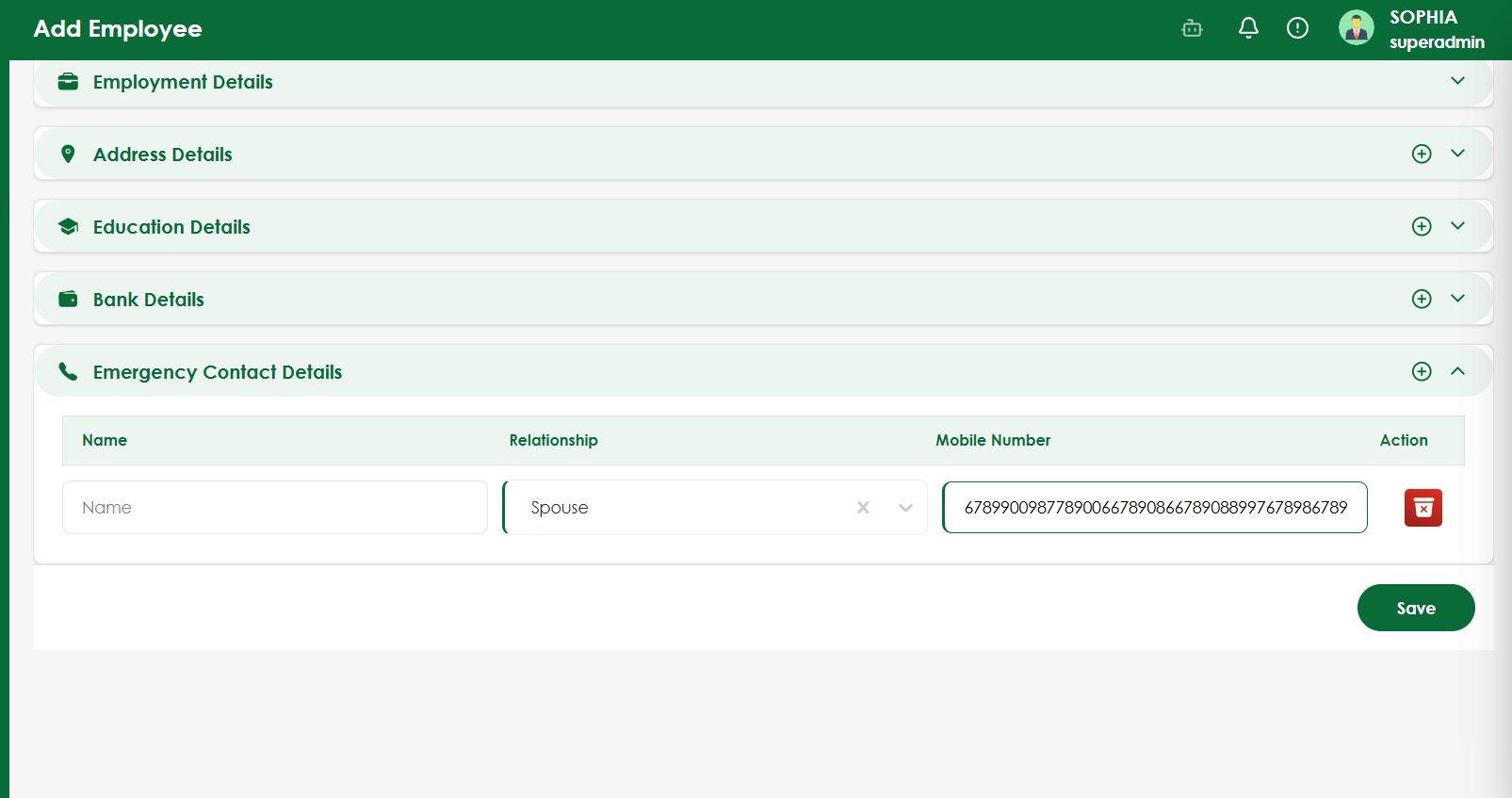
openVerify maximum length validation for Emergency Contact Mobile Number
Start date:
08/13/2026
Due date:
% Done:
0%
Estimated time:
Platform:
Web
Description
| Field | Details |
|---|---|
| Test Case ID | TC_EMP_MOB_001 |
| Test Scenario | Verify maximum length validation for Emergency Contact Mobile Number |
| Module | Employee Management |
| Priority | Medium |
| Test Type | Functional / Validation |
| Precondition | User is on Add Employee → Emergency Contact Details |
| Test Data | Mobile number exceeding the allowed maximum length |
| Steps | 1. Expand Emergency Contact Details. 2. Enter a valid Name. 3. Select Relationship. 4. Enter a mobile number exceeding the maximum allowed digits. 5. Click Save. |
| Expected Result | The system should restrict the Mobile Number field to the configured maximum number of digits or display an appropriate validation message. The employee should not be saved with an invalid mobile number. |
| Actual Result | Mobile Number field accepts more digits than the allowed length without validation. |
| Status | Fail |
| Severity | Medium |
Files
Actions