Actions
Bug #546
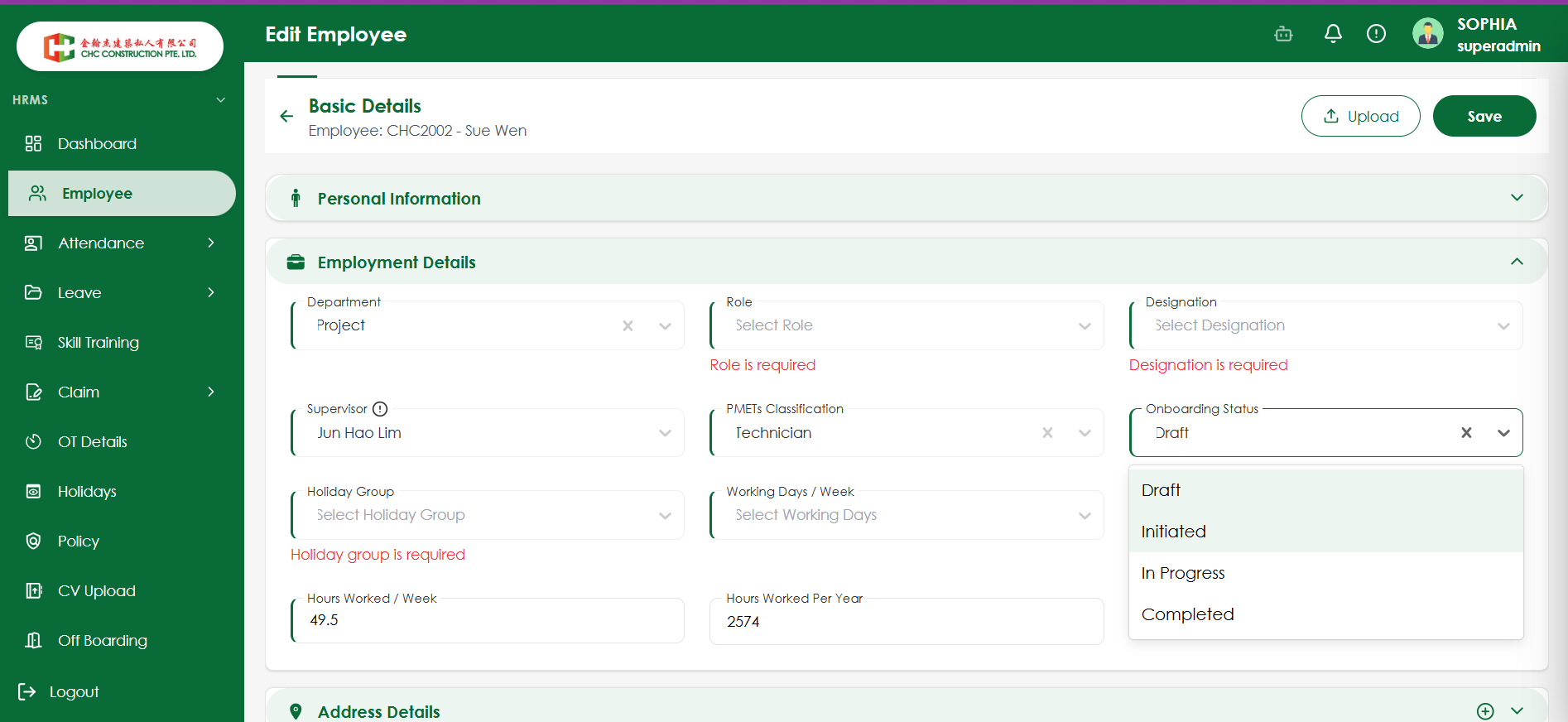
openVerify Onboarding Status is cleared when the X (clear) button is clicked
Start date:
08/13/2026
Due date:
% Done:
0%
Estimated time:
Platform:
Web
Description
| Field | Details |
|---|---|
| Test Case ID | TC_EMP_ONB_001 |
| Test Scenario | Verify Onboarding Status is cleared when the X (clear) button is clicked |
| Priority | Medium |
| Testing Type | Functional Testing / UI Validation / Negative Testing |
| Precondition | User is on the Edit Employee page |
| Test Data | Onboarding Status: Initiated |
| Steps | 1. Open Edit Employee page 2. Navigate to Employment Details 3. Select Initiated from Onboarding Status 4. Click the X (clear) icon |
| Expected Result | Onboarding Status should be cleared and the field should display “Select Onboarding Status” |
| Actual Result | Onboarding Status automatically changes back to Draft |
| Status | Fail |
Files
Updated by Raja MK about 2 months ago
- Status changed from Ready to test to Reopen
Actions