Actions
Bug #565
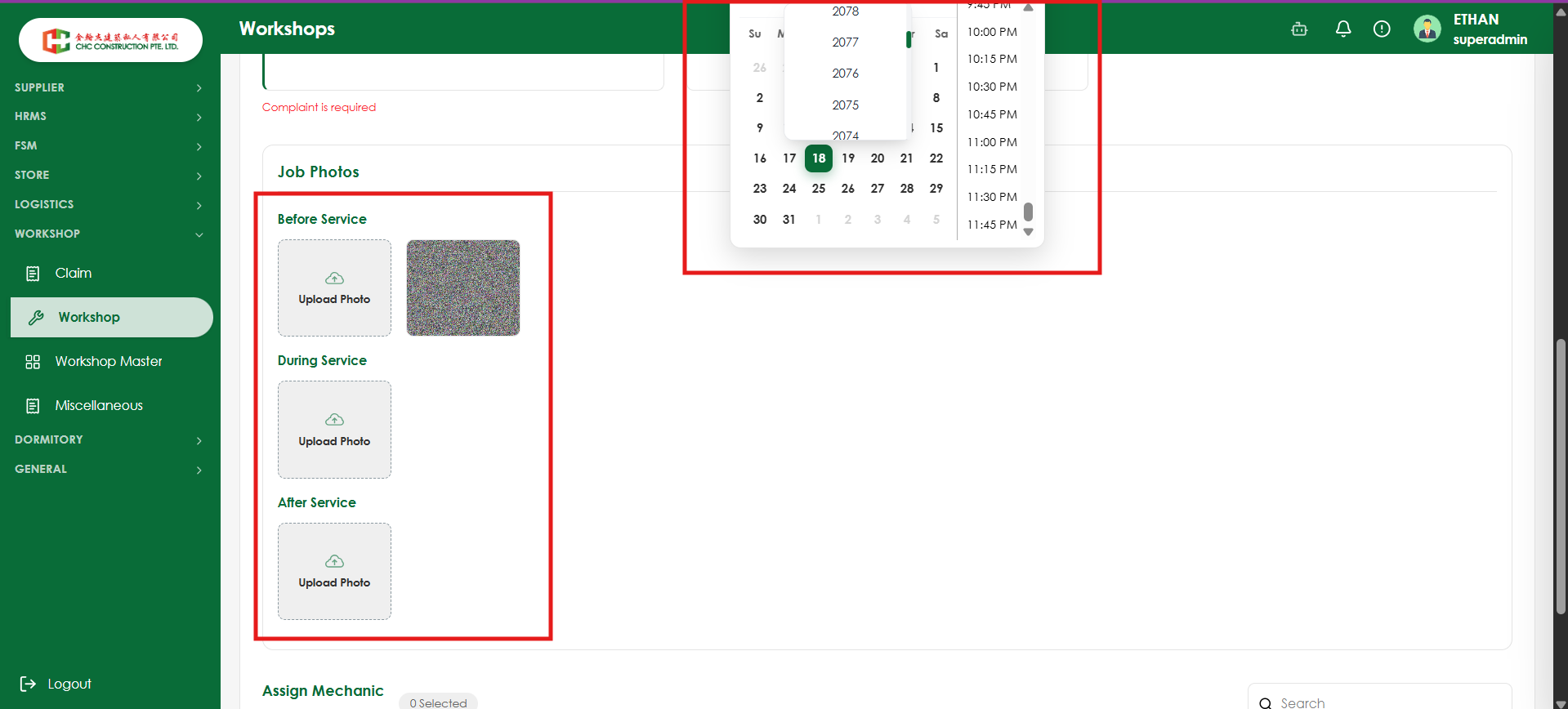
openVerify Calendar Date-Time Picker UI alignment and visibility
Start date:
08/19/2026
Due date:
% Done:
0%
Estimated time:
Platform:
Web
Description
| Field | Details |
|---|---|
| Test Case ID | TC_WRK_001 |
| Module / Vertical | Workshop |
| Test Scenario | Verify Calendar Date-Time Picker UI alignment and visibility |
| Priority | Medium |
| Testing Type | UI / Functional |
| Precondition | User is logged in and has access to the Workshop module |
| Steps | 1. Navigate to Workshop. 2. Open a screen containing the Date-Time field. 3. Click the Date-Time picker. 4. Select a date and open the time dropdown. 5. Observe the calendar and time picker positioning. |
| Expected Result | Calendar and time picker should be displayed properly within the screen without overlapping other UI elements. All dates, years, and time options should be clearly visible and accessible. |
| Actual Result | The Date-Time Picker overlaps with the surrounding UI/container, causing the calendar/year and time options to appear improperly positioned. |
| Status | Fail |
| Defect | Calendar Date-Time Picker UI Overlapping Issue |
Files
Actions